
Introduction
Hello and welcome to the PV247 Modern Web Development course!
This course provides a solid foundation in modern frontend development, primarily using React, with a particular focus on Next.js. Halfway through the course, you should have enough knowledge to create your own simple React applications. To pass the course, you must demonstrate that you can build a full-stack application with TypeScript and Next.js that can be professionally extended after the course.
Topics
- Introduction
- React
- Styling your app, Tailwind, accessibility
- Component lifecycle, state & effect
- Memoization, refs, context and tables
- Async, TanStack Query, forms and Zod
- Next.js - The React Framework for the Web
- Next.js - Loading UI and streaming, API routes, React Server Components
- Next.js - Caching, database, Server Actions, API routes
- Authentication, metadata, deployment
We are experienced developers who actively work with the technologies taught in this course. We all have portfolios of applications created as personal or hobby projects, as well as larger projects at work. Some of us work at InQool, an industry partner of the Faculty of Informatics and the course provider.
Dalibor Pantlík
Dalibor is a frontend developer with overlap into the backend as well, with almost five years of experience in three companies in total. Currently, he holds the position of lead frontend developer at InQool. He graduated from FI MUNI in June 2024, with part of his master’s thesis focused on preparing material for this course.
Maroš Beťko
Maroš is a full-stack engineer focused on TypeScript, React, and Next.js. He graduated from FI MUNI and continued building practical products and developer tooling, with experience across frontend and full-stack development. He is especially interested in type-safe systems, performance, and creating maintainable software.
Ladislav Burgr
Laďa is a software developer at InQool and a recent graduate at FI MUNI. He started programming in high school with WordPress and PHP, but gradually moved to React and Next.js.
About InQool
InQool was founded in 2010 by three graduates of the Faculty of Informatics at Masaryk University. Now, it boasts a team of over 70 developers dedicated to creating web applications and native applications for mobile devices. The company primarily focuses on projects for the public sector, where its developed information systems contribute to the digitalization and improvement of administrative processes. Regarding technology, the company prefers Java for the backend and React or Next.js for the frontend.
The PV247 course at Masaryk University's Faculty of Informatics was not previously associated with InQool. However, in 2019, the company took the lead on this course with a vision to attract frontend-focused developer talent more effectively. Through ongoing contact with students during the semester, InQool developers have a unique chance to meet and eventually engage new promising talent.
Course organization
The course consists of ten weekly 2.5-hour blocks. Typically, the first hour and a half is a lecture introducing new technology. During the following hour, the practicum, students can work on the weekly assignment while teachers remain available. Students must attend the lecture. They may complete the weekly assignment independently at home, but we recommend working on it immediately after class while teachers are available to answer questions.
Prerequisites
This course requires a basic knowledge of web development and programming in a scripting language. Students who have not taken PB138 "Web Development and Markup Language Fundamentals," which introduces web development and React programming, must independently study the basics of JavaScript, TypeScript, React, and REST APIs. It is not possible to cover every aspect of web development in detail, so these prerequisites are necessary.
Course objective
The course's main objective is to provide enough information and knowledge to enable students to develop a complete full-stack web application at the end of the course.
The main focus is the frontend part of the application. However, thanks to Next.js, the course also partially covers server-side and database development. The course outcomes include more than the ability to create an application: they also include an overall understanding of modern web principles, especially on the client side.
Evaluation
Each week, students are given a short homework assignment to turn in within one week. Some weeks, the assignment will be worth 10 points; some weeks, it will be worth 30 points. In total, up to 210 points can be earned for homework.
At the end of the semester, students will form teams of 2–4 people and develop a collaborative final project (web application). The team project is graded on a pass/fail basis... don’t worry! :) After presenting your project, you’ll receive either a pass or a fail. If you don’t pass, you’ll have the opportunity to address the issues and resubmit.
To pass the colloquium, a minimum total of 130 points from homework is required. Furthermore, only two unexcused absences are allowed.
Homeworks and team project
Homework will be assigned each week, and you will have one week to work on it so that we can look at it together the following week. Some assignments will be graded with a maximum of 10 points, some with 30 points. If there is a significant problem or unmet requirement, it will be deducted in quarters, i.e., 25 points.
The final project can have any topic and must meet the basic requirements for the final project, which will be specified later. You should start working on it during the semester, around weeks 7 and 8. There will be a short review of your projects in week 11, where we will want to see that you have at least started the project and have implemented 20% of it. Project presentations will be held 13th week of the semester. The project will be graded as pass/fail.
Today's lecture
In today's lesson, we will introduce frontend development. We will explore who a frontend developer is and place this role in the broader context of developing modern applications, not only web applications. Next, we will discuss the web platform and the terms we will encounter throughout the course. We will then focus on the programming languages that will guide us through the course: JavaScript and TypeScript. Finally, we will discuss the frontend ecosystem and tools for improving code quality.
Who is a frontend developer?

Frontend web development, also known as client-side development, is the practice of producing HTML, CSS, and JavaScript for a website or web application that users can see and interact with directly. Frontend developers are responsible for implementing both a website's design and its functionality.
The work of a frontend developer is not limited to programming the application. Because they develop what end users or customers see, it is essential to understand design and the principles of user experience (UX) and user interface (UI) design. Large companies often have dedicated experts and designers for these purposes. However, developers commonly devise and design parts of the UI or entire pages. An attractive, clear, and intuitive user interface is essential to a successful web application.
Goal
The goal of the frontend developer is to ensure that end users can use the application effectively and efficiently to obtain relevant information. This is further complicated by the fact that users use the app on different devices with different screen sizes. The developer must, therefore, consider different browsers (cross-browser), devices (cross-device), and operating systems (cross-platform).
Dynamic and rapidly changing area
The frontend area is very dynamic and rapidly changing. Developers must (or at least should) keep up with current trends or risk their code becoming outdated quickly. In the last few years, several new fundamental principles have emerged in this area, making frontend a challenging discipline. As it may seem, it is not just about dealing with the design of individual elements on a page but implementing functionality, storing application state, caching, and a host of other things a frontend developer must address to achieve a quality web application.
Web platform
There are multiple platforms on which a frontend programmer can develop applications. Among them is the web platform, which has the advantage that it can be accessed by virtually all devices through a web browser. Developers on this platform use technologies such as HTML, CSS, and JavaScript.
HTML, CSS, JS
HTML and CSS are used to create the user interface and position elements on the screen.
HTML (HyperText Markup Language) serves as the backbone of any web application. It defines the structure of the actual page, and the semantics of the elements are determined based on HTML tags. These tags have a predefined appearance that may vary slightly from browser to browser. Tags can be dynamically added, removed, and modified using JavaScript and have styling assigned using CSS to achieve a modern and intuitive user interface.
CSS (Cascading Style Sheets) ensures that elements are correctly positioned and look good on the page. It can style elements through selectors, including classes assigned to HTML elements.
JavaScript (JS) is a scripting language that enables interactivity on a page. It lets buttons perform actions and lets elements be reordered or hidden based on conditions.
DOM
The Document Object Model (DOM) represents the structure of a webpage as a logical tree of nodes. It also defines methods through which the structure of the page, its styling, or content can be programmatically altered. The Document interface describes the HTML DOM, and individual HTML tags also have their interfaces. For example, <button> is represented by the HTMLButtonElement interface, which defines all the methods and attributes of the button and how we can programmatically manipulate it.
reference: MDN Web Docs
Web API
A Web API is a set of browser-provided interfaces for interacting with the web platform. The DOM mentioned above is one such API. Other well-known APIs include fetch (for retrieving data over the network, for example from a backend), the File API (for working with files), the History API (for inspecting and manipulating the browser history), and window (for accessing browser storage such as localStorage or sessionStorage, opening a new window, and more).
Frontend frameworks
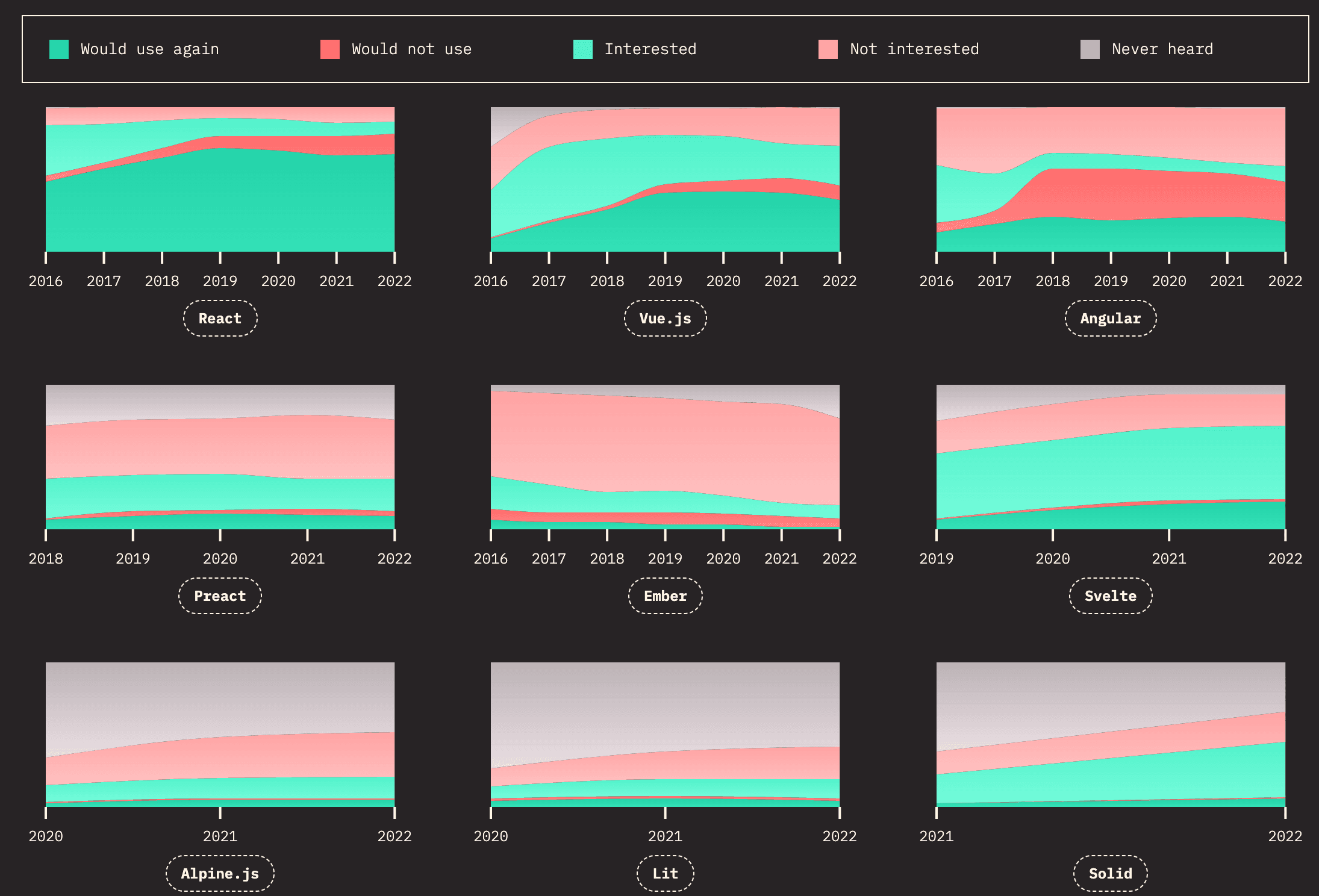
It is well-known that JS frameworks are created and evolve very quickly. Discussion about which framework is the best and which one to choose in general for all use cases could be relatively useless. There is not only one framework that fits some use cases initially. Despite this, trends have been set over the last few years, and some frameworks are at the forefront and hold their position and dominance. These trends are tracked annually through surveys, and developers have regularly put React in the top position in recent years. The fact that one framework has established itself is good for the entire frontend development and community. For more information, not just about frameworks, check out the StateOfJS survey, which tracks the popularity of frameworks and all things around the JavaScript world in general.
JavaScript
JavaScript (JS) is a flexible and powerful scripting language that forms the basis of frontend development. As the scripting language of the web, JavaScript is essential in creating dynamic and interactive user experiences. Knowledge of JavaScript will be a prerequisite when working with React or any modern web framework.
Here is a list of general advice for working with JavaScript:
- There is rarely a reason to use
var. Always start withconstand change it toletif you need to reassign the variable. - Always use
===instead of==. This eliminates the possibility of errors caused by unexpected type coercion. - Familiarize yourself with how the spread operator
...and object destructuring work. Destructuring is commonly used when accessing component props or a state hook in React. - Prefer using optional chaining
?.together with nullish coalescing??. Since type coercion in JavaScript works the way it does, using these operators is safer. - Learn how array methods like
map,join,filter, andreducework. They are great for keeping your code without side effects caused by mutating your data and are also more compact and readable than generalfororwhileloops.
JavaScript continues to evolve. New language versions introduce features that may not be supported in every browser, so check browser compatibility before using them. The 2015 release, known as ES6, introduced many foundational features; review this list and become familiar with most of them. ES2023 also introduced useful array-method updates.
Node
To run JavaScript outside a browser, we need a runtime. Node.js is an open-source, cross-platform runtime environment for executing JavaScript code. It is widely used for server-side programming, allowing the same programming language to be used on both the server and client.
We will encounter Node.js when we discuss Next.js later in the semester; Next.js uses the Node.js runtime by default. Node.js was introduced in 2009. Alternatives, including Bun, have since emerged with different trade-offs and goals.
Install the current LTS release - Next.js 16 requires at least Node.js 20.9, and the tooling around it (including modern linting and formatting tools such as oxlint and oxfmt) has already moved past Node 18. Check what you have with node --version. If you need to switch between versions on the same machine, use a version manager such as nvm or fnm, and pin the version for a project in an .nvmrc file.
Bun

Bun aims to provide a fast, unified JavaScript runtime while maintaining compatibility with much of the Node.js and npm ecosystem. If you have used Node.js before, learning Bun is relatively easy. Bun includes tooling that can replace several tools commonly used with Node.js.
Bun serves not only as a JavaScript runtime but also as a transpiler (converting one language to another, in this case TypeScript to JavaScript), bundler (handling the code in your project, including installed packages), and package manager. We will not use it in this course, but it is a technology worth following.
Node Package Manager
Node Package Manager (npm) is the world's largest software registry, similar to NuGet in the C# ecosystem. Open-source developers around the globe use npm to share and use packages, and many organizations also use npm to manage private packages.
package.json
The package.json file is an application's manifest. It contains project metadata and enables dependency management. It also has a scripts section for commands run from the command line, such as building the app, running it in development mode, or running a linter. By centralizing this information, package.json helps maintain an organized and consistent development environment and supports collaboration.
{
  "name": "pv247-app",
  "version": "0.1.0",
  "private": true,
  "scripts": {
    "dev": "next dev",
    "build": "next build",
    "start": "next start",
    "lint": "eslint ."
  },
  "dependencies": {
    "next": "16.2.3",
    "react": "19.2.5",
    "react-dom": "19.2.5"
  },
  "devDependencies": {
    "@types/node": "^24",
    "@types/react": "19.2.14",
    "@types/react-dom": "19.2.3",
    "eslint": "^10.0.0",
    "eslint-config-next": "16.2.3",
    "prettier": "^3.2.5",
    "typescript": "^5.9.3"
  }
}
Npx
From version npm@5.2.0, alongside npm, a binary called npx is also installed. npx is a tool intended to help round out the experience of using packages from the npm registry. In the same way, npm makes it super easy to install and manage dependencies hosted on the registry, npx makes it easy to use CLI tools and other executables hosted on the registry. For example, we will use npx to scaffold a new project using create-next-app.
Creating packages
While npm provides free public package hosting, it also provides a CLI for working with packages locally. Every project with a package.json can be published as a package and imported into other projects. You can use npm init to create a minimal package.json by following a few prompts. After that, you can install dependencies and add scripts.
Other package managers
Yarn is an alternative package manager to npm. Historically, it was created because npm had many issues, but nowadays the differences are small and the choice is largely a matter of preference.
There is also pnpm, which boasts its ability to save disk space by using a single node_modules cache and linking to it from your packages instead of making a copy for each project.
Tooling, linting and formatting
While at first glance similar, formatters and linters aim to fix different problems. Formatters mainly take care of indentation, new lines, and automatic wrapping. Linters handle various coding conventions and rules you want to follow, like controlling unused variables, usage of let/var, etc. Generally, linters provide warning messages about broken rules, but many also have autofix actions that blur the line between linters and formatters even more.
Oxfmt
oxfmt is the formatter in the Oxc ecosystem for JavaScript, TypeScript, and related web files. It is designed to be fast and lightweight, which makes it a strong modern alternative to Prettier in large codebases. Many projects still use Prettier because it has a long track record and a broad ecosystem, but Oxc is a newer option that often runs noticeably faster and fits well with modern frontend toolchains.
You can install it with npm and then run it directly on your project files:
npm i -D oxfmt
npx oxfmt .
/** Without oxfmt */

export function KeyDemo() {
	const [items, setItems] = useState(['Item 1', 'Item 2', 'Item 3']);

	return (<ul>
			{items.map(item => (<ListItem item={item} key={item} />))}

			<li><button onClick={() => setItems([...items].reverse())} type="button">
					Reverse items button
			</button></li>
		</ul>);
}
/** With oxfmt */

export function KeyDemo() {
  const [items, setItems] = useState(['Item 1', 'Item 2', 'Item 3']);

  return (
    <ul>
      {items.map(item => (
        <ListItem item={item} key={item} />
      ))}

      <li>
        <button onClick={() => setItems([...items].reverse())} type="button">
          Reverse items button
        </button>
      </li>
    </ul>
  );
}
Oxlint
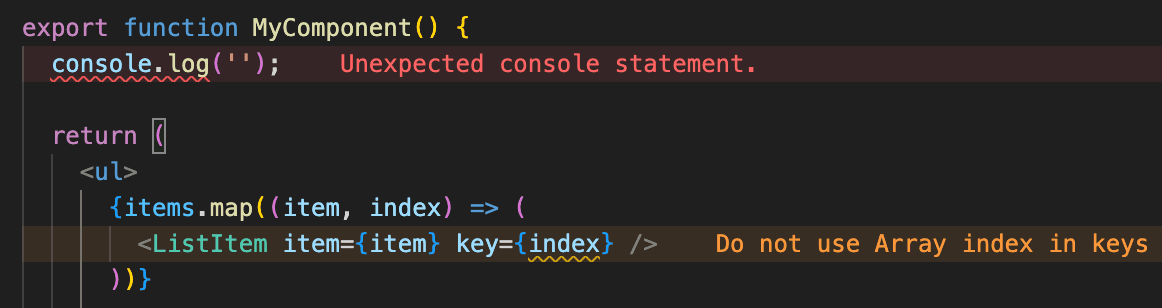
oxlint is the linter in the Oxc ecosystem for JavaScript and TypeScript code. It is designed for speed and good defaults, and it is often a more performant alternative to ESLint in large applications. Many existing projects and tutorials still use ESLint, but Oxc is a newer, high-performance option that keeps a familiar rule-driven workflow while being much faster to execute.
A lot of oxlint rules are intentionally aligned with the rule names and conventions developers already know from ESLint, and many of them are backwards compatible in practice. That makes migration easier when a project already has lint rules defined in the older ESLint ecosystem.
For a typical project, you install oxlint and run it directly from the command line:
npm i -D oxlint
npx oxlint .
A configuration file can be kept small and explicit:
{
  "rules": {
    "no-console": "off"
  },
  "ignorePatterns": [".next/**", "out/**", "build/**", "next-env.d.ts"]
}
TypeScript
TypeScript is a statically-typed superset of JavaScript that brings a multitude of powerful features to the world of web development. It was designed to enhance the maintainability and scalability of JavaScript projects by providing a strong type system and advanced tooling. Here's a summary of TypeScript's most interesting features:
- Static Typing: TypeScript enforces strong typing, allowing developers to catch type-related errors during development rather than at runtime. This leads to more robust and bug-resistant code.
- Type Inference: TypeScript can often infer types without explicit annotations, making the code concise while still being statically typed.
const name = 'John';
//      ^-- string
const name: string = 'John';
Only provide type declarations when necessary. Inferred types are based on the assigned values; manually written annotations can become incorrect as code changes.
/** TypeScript */

const getPath = (url: string) => {
  return url.split('https://')[1];
};

// ...

getPath(1);
//      ^--- Error: Argument of type 'number' is not assignable to parameter of type 'string'.
vs
/** JavaScript */

const getPath = url => {
  return url.split('https://')[1];
};

// ...

getPath(1);

// Runtime error - Uncaught TypeError: url.split is not a function
Because the any type can break out of the safety of static typing, try to use it only as a last resort.
/** TypeScript */

const getPath = (url: any) => {
  return url.split('https://')[1];
};

// ...

getPath(1);
//      ^--- No error.

// Runtime error - Uncaught TypeError: url.split is not a function
-
Interfaces and Type Aliases: Developers can define custom types with interfaces and type aliases, facilitating code readability and reusability.
interface Person { name: string; age: number; } type Point = { x: number; y: number }; -
Union and Intersection Types: TypeScript supports creating complex types by combining multiple types using unions and intersections.
type Status = 'active' | 'inactive'; type Employee = { name: string } & { role: string }; -
Enums: Enums provide a way to define a set of named constant values, improving code readability and maintainability.
enum Color {
  Red,
  Green,
  Blue
}

let chosenColor = Color.Red;
An interesting alternative is having an array of possible values and inferring the type from it.
const colors = ['Red', 'Green', 'Blue'] as const;
type Color = (typeof colors)[number];
//    ^-- "Red" | "Green" | "Blue"
-
Generics: TypeScript supports generics, allowing you to write reusable and type-safe code components.
function identity<T>(arg: T): T { return arg; } let result = identity<string>('TypeScript'); // result is of type string -
Strict Null Checks: TypeScript introduces strict null checks to prevent null and undefined runtime errors.
let user: string | null = null; console.log(user.length); // ^--- Error: Object is possibly 'null' -
Utility Types: TypeScript provides utility types that allow developers to easily manipulate and transform types. These utility types include
Partial,Required,Readonly,Pick, andRecord, among others. They simplify common type transformations and enhance code expressiveness and maintainability. For example:interface User { name: string; email: string; } // Makes all properties in User optional type PartialUser = Partial<User>; // Makes all properties in User readonly type ReadonlyUser = Readonly<User>; // Picks selected properties from User type UserSubset = Pick<User, 'name'>; // Creates a dictionary with User objects type UserDictionary = Record<string, User>;These utility types empower developers to work with types in a more dynamic and expressive manner, reducing the need for redundant type definitions and improving code reuse.
-
TypeScript Definition Files: TypeScript definition files (.d.ts) allow you to add type information to JavaScript libraries, enabling better type checking and autocompletion.
These features make TypeScript a compelling choice for developers looking to improve code quality, catch errors early in development, and enhance the overall developer experience in JavaScript-based projects.
Next lecture
In the next lecture, we will dive into the React library. We will cover the basics of React, including components, props, TSX, imports, and responding to events. We will also explore the benefits of using TypeScript with React.
Assignment
This week's TypeScript assignment involves enhancing an npm project by defining types and implementing four functions. Follow the descriptions in the project files, ensure your code passes linter checks, and matches the provided output.

